




Internal linking is one of the key factors in optimizing and ranking sites in search engines. This process is actually called creating links between different pages of a website. Sites are better seen in Google search results and other search engines by using internal linking correctly. In this article, we will examine the importance of internal linking, its difference from external linking, methods of creating internal links and tools used in this regard. In addition, common errors in internal link optimization and effective solutions to prevent them will also be examined.
By the end of this article with Gelavizh Stay tuned.
What is internal linking and why is it important?
Internal linking is a process of improving SEO (search engine optimization) in which links are created between the internal pages of a website. In this method, internal links are placed on keywords related to the target page and users are redirected to other pages by clicking on them. Internal linking is known as one of the important factors in improving the ranking of a site in search engines. This method has a direct impact on the display of pages in users’ search results and makes search engines better identify related pages.
The benefits of internal linking include the following:
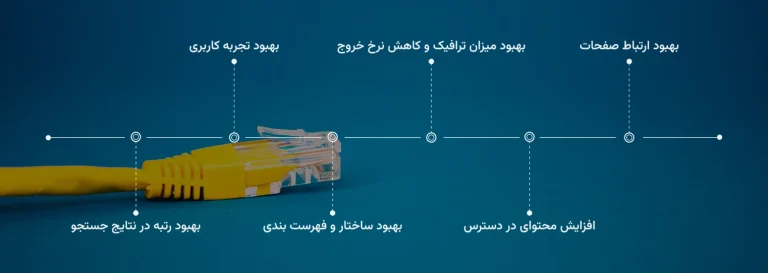
- Improve user experience: By providing internal links, users can easily access other pages and have a better experience using the site.
- Improve page connectivity: Internal link optimization creates strong connectivity between pages on a website and helps improve the structure and order of the site.
- Increasing accessible content: Developing internal links makes various site content easily accessible and allows users to fully utilize the information available on the site.
- Improve ranking in search results: Internal linking helps search engines better identify related pages, thus improving the site’s ranking in search results.
- Improve site structure and indexing: Intrasite linking helps optimize the internal structure of the site and link pages together in a regular and orderly manner.
- Improve traffic and reduce bounce rate: By creating internal links, more users are directed to the site’s internal pages and the bounce rate is reduced.
The difference between internal and external links
Both types of internal and external links have different functions and have different effects on SEO and site rankings. The differences between internal and external links in improving SEO and site rankings are:
- Source: Internal links use a source within the site and point to other pages from the same domain, while external links point to other sites and pages from different domains.
- Website Structure: Internal links are placed within the website structure and are used to connect pages together. These links strengthen the structure of the site and help users access related pages, while external links are embedded to connect to other domains.
- Level of Control: You can fully control your website’s internal links and manage their structure and destination. In contrast, you cannot directly control external links, which are the responsibility of other websites.
In general, both types of internal and external links are important in improving SEO and ranking. Internal links facilitate the improvement of the structure and internal pages of the site, while external links increase the credibility and international connections of the site. By effectively using both types of links in your SEO strategy, you can experience a significant improvement in the ranking of your site.
How to do internal linking?
Internal linking has methods and tips that we have discussed below:
Choosing the right keywords
Choosing the right keywords for internal linking is very important because these words make the destination pages well known and also have an impact on improving SEO and site rankings. Below, we will review the necessary tips for choosing the right keywords for internal linking:
- Relevance to content: Make sure that the keywords chosen for internal linking are relevant and consistent with the content of the destination page. The keywords should reflect the important and main aspects of the page and be understandable.
- Use tags: Use tagged links as much as possible. You can insert key links between the text using tags in your content management system or by hand coding.
Overall, it should be noted that improper use of internal links may actually harm your site’s SEO and ranking, rather than improving it. So be sure to take the above tips seriously.
Optimizing links for search engines
Link optimization is very important for search engines because links play a significant role in improving a site’s position in search results. Below, we will examine link optimization strategies:
- Use related elements: First of all, make sure your internal links point to pages that are relevant to the content on the current page. This will emphasize to search engines that your content is about a specific topic and will help you rank better in search results.
- Structured Link Display: If you are using a hierarchical structure for internal links, make sure that the structure makes sense. This process helps search engines understand the structure of the site.
- Use keyword links: Using keyword links means linking to keywords that are relevant to the content of the page. These keywords should be directly related to the content of the page and placed in sentences that are understandable to users and search engines. For example, instead of using the phrase “click here”, it is better to use keywords that are relevant to the destination page, such as “download link optimization guide”.
- Link Persistence: Frequent changes in link addresses have a negative impact on search results. If you absolutely must change a link address, use redirects to redirect the old link to the new one.
- Check for broken links: Make sure all links on your site are valid and accessible. Broken links can lead to a bad user experience and negatively impact your page rankings in search results.
There are a few other tips (apart from the two above) that will help you do your internal linking in the best possible way:
– Place important links on all pages: Important pages with high rankings should be available on all internal pages of the site using relevant internal links. This helps users access important pages faster.
– Using menus and lists: In website design, using menus and lists as appropriate internal links to direct users to different pages of the site is very effective.
– Use old links: Using link monitoring tools, you can find links to old pages and change them to new, appropriate internal links.
– Continuous testing: Internal link optimization is a complex process and requires constant trial and error to improve your site’s ranking in search results. Testing different methods and analyzing their results will improve the quality of your internal linking.
Common mistakes in internal linking
- Not using keyword links: One of the common mistakes in internal linking is not using keyword links. As we said, keyword links refer to keywords that are relevant to the target page. To avoid this mistake, use relevant and important keywords when creating internal links.
- Creating too many links: Creating too many links on a page can hurt the page’s ranking in search results. It’s best to keep the number of internal links limited and only point to relevant and valuable pages.
- Using generic text in links: Using link text like “here” or “read more” instead of relevant keywords is a common mistake in link building. Always try to use understandable and relevant text.
- Linking to irrelevant pages: Linking to pages that are not directly related to the content of the current page can negatively impact search engines’ determination of the authenticity and value of the link.
- Failure to update links: Failure to update links when page addresses change can cause broken links.
- Not following the hierarchical structure: The tree and hierarchical structure of links is very important. Try to create internal links in a hierarchical and tree form so that users and search engines can easily search your site.
- Using the same links on different pages: Using the same or duplicate links on different pages has negative effects on the page rankings. Each internal link should point to a specific page and repetition of the same links on different pages should be avoided.
- Not improving the navigation structure: The navigation structure of the site is very important for internal linking. If the navigation structure is not designed properly, it will cause irrelevant and ineffective links. So try to improve the navigation structure of your site so that internal linking is done properly.
- Not checking broken links: Broken links are links that point to pages that no longer exist. Regularly checking and updating broken links will prevent common internal linking mistakes. Use tools like Google Search Console to find and update broken links.
- Not using SEO optimization approaches: To optimize internal links, SEO optimization methods should be used. Studying and becoming familiar with SEO optimization methods will help you in this.
- Not paying attention to the order of priority in linking: When linking to internal pages, be sure to consider the order of priority of links. The pages that are most important should receive more links. This will help increase the authority and credibility of the more important pages and improve their ranking.
- Not using a sitemap: A sitemap is a collection of internal links that helps Google and other search engines understand the structure and pages of your site. Reviewing and creating a regular sitemap will improve internal linking and help search engines crawl and index your pages.
- Nofollow Internal Links: Do not tag internal links on your site at all. If your site’s internal links are nofollow, you will not see much change in search engine results. Of course, good traffic will still be directed to the site page and the user’s time on your site will also increase, but the value and credibility of your pages will be lost. It is better to use this tag only if you are sure that the page is not that valuable to you and that way you can nofollow it.
-
What Is Internal Linking And How Is It Done?
Using automated link building tools
Link building tools are tools that help you in the process of building and managing internal and external links on your site. These tools have the ability to create automatic links using specific algorithms, and their main goal is to increase the number of incoming links to your site and improve its position in search results.
For example, one popular link building tool is SEMrush, which allows you to do your keyword research and check the links pointing to your site. There are also other tools like Ahrefs, Moz, Majestic, and Screaming Frog that give you similar link building and link management capabilities. Using these tools, you can check and compare the incoming links to your site, build external links, or even identify broken links to improve your site’s ranking in search results.
The benefits of using automatic link building tools include:
- Save time and effort: By using automated tools, you can create many links in a short time, which saves you from having to spend time and manual work on link building.
- Increase the number of inbound links: By creating automatic links, you can increase the number of inbound links to your site.
- Access to a wider range of resources: These tools allow you to access a wider range of resources for link building. This can help diversify your links and increase your site’s authority.
Of course, using automatic link building tools comes with limitations and points that should be considered:
- Risk of being penalized: Incorrect use of these tools can lead to your site being penalized by search engines. Therefore, you should use these tools carefully and in the right ways.
- Quality of Links: Some automated link building tools may create ineffective links or spammy posts, so make sure to use quality and reputable tools.
- Pay attention to search algorithms: Search engines have improved and can easily detect automated links. Therefore, the use of these tools should be done with a specific purpose and taking into account the algorithm of Google and other search engines.
- Various settings: You need to make precise settings for automatic link building tools. By determining the required criteria and parameters, you can achieve the best results.
- Link Diversity: Ensure the integrity and diversity of the incoming links to your site. By creating links from different sources such as blogs, social sites, directories, etc., you can increase the authority and power of your site.
- Combine with manual methods: Using automated link building tools exclusively can lead to certain problems. It’s better to use a combination of manual and automated link building methods. For example, you can carefully and manually place your main links on your strategic pages and use automated tools to create more detailed links.
Overall, using link building tools should be done with intelligence. It is also very important to have precise settings and control over the link building and management process. To make the most of these tools, you can read the relevant guides and resources and be sure to consider important points.
Conclusion
Sometimes the SEO process can get a little complicated. You may even have to spend a few days researching and reviewing to achieve the desired result. However, internal linking on the site is one of those techniques and methods that is very effective and relatively easy. We recommend that you use the tips in this article to test internal linking for a while and if you see a positive effect of linking within the site, continue this process with vigor. By creating appropriate internal links, you can professionally influence the internal structure of your site and improve important pages. Given the importance of internal linking, it is better to do this operation regularly and use it intelligently.
To find out about the conditions of receipt Digital Marketing Services Contact us.
Frequently Asked Questions
1. What are keywords in SEO and why are they important?
Keywords are phrases that users enter into search engines to find information. These words play a key role in how your site’s content appears in search results and help improve page visibility.
2. How to choose the best keywords for your website?
To choose the right keywords, you should use tools like Google Keyword Planner, Ahrefs, or SEMrush and choose phrases that are relevant, highly visited, and have balanced competition.
3. What is the difference between short-term and long-term keywords in SEO?
Short-tail keywords consist of one to two words and usually have high competition, while long-tail keywords consist of three or more words and attract a more targeted audience.
4. What role does user intent play in keyword selection?
Understanding user intent helps us understand whether the audience is looking for educational information, a purchase, a comparison, or a solution. Choosing keywords based on this intent increases conversion rates and user engagement.
5. Does using too many keywords improve your site’s ranking?
No. Keyword stuffing can cause your site to rank lower. It’s better to use keywords in a natural and relevant way across different sections of your content.
6. What is the difference between informational and commercial keywords in SEO?
Informational keywords are used for educational or awareness searches, while business keywords are used to attract potential customers and increase sales.
7. How can you evaluate keyword performance?
By examining statistics such as search volume, click-through rate (CTR), ranking in Google results, and the amount of incoming traffic, you can measure the performance of each keyword and improve your SEO strategy if needed.
